2022WinterTeam5
Team 5: Charging On The Go
Team Members
- Andrew Hallett, MAE
- Juan SanJuan, ECE
Project Overview
Concept Inspiration:
- We were inspired by in-flight refueling of aircraft. Taking this concept and applying it to electric autonomous vehicles we could potentially recharge vehicles out on the road without them needing to slow down or stop from their current task. In this project we explore methods of autonomous driving and tracking while the recharging concept is only visualized through an augmented reality overlay on the back of the low power state vehicle. If we were to explore the charging method in another project we thought about ways of doing this through cable connections, inductive charging, or regenerative braking.
Goals:
- Build 2 autonomous vehicles
- Implement autonomous driving using ROS2
- Implement a tracking solution to identify the low power state car
- Use the tracking solution to update the steering and throttle controls
- Simulate recharging through a visual representation
Gantt Chart

Autonomous Vehicles
CAD/Mechanical Designs
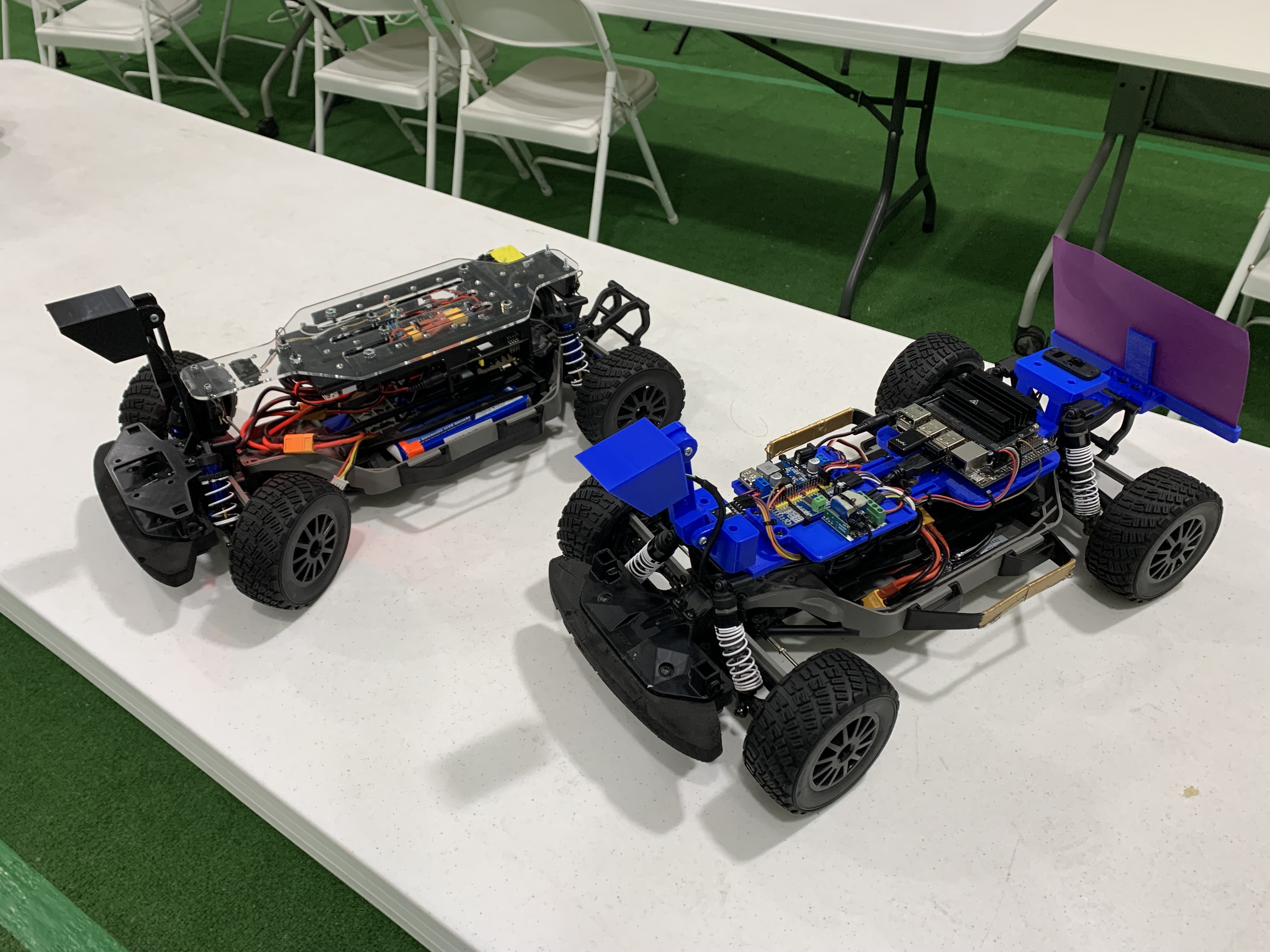
There was no need for 2 different designs here. The black car was the original design, which featured a hinged mechanism to flip open the electronics bay. The blue car was updated based on features that didn't work on the first vehicle. The goal for the 2nd design was to have an open, more sleek concept so the parts were easily accessible if troubleshooting needed to be performed. This vehicle also included a new feature which clipped onto the rear bumper to hold the purple tracking solution card.
Wiring
DonkeyCar
3 Laps Video
OpenCV/ROS2
3 Laps Video
Final Project
Autonomous Driving
The first goal of the project was to get both vehicles driving on the class track using the provide ROS2 code. This process involved calibrating the camera to track the contours of the yellow lines on the road, and calibrating the steering and throttle controls.
Issues:
- The camera calibration depends on the lighting of the environment.
- We tried to calibrate the motors so the vehicles would drive as slow as possible on the track. This became an issue when we swapped batteries and would sometimes result in the car not moving at all when testing our code.
Solutions:
- It is recommended to do the calibration at night where the lighting is more consistent and always test on the track in those conditions.
- To fix the battery issue we would use "ros2 launch ucsd_robocar_nav2_pkg all_components.launch.py" to activate all components and then send velocity commands to the motor using "ros2 topic pub /cmd_vel geometry_msgs/msg/Twist "{linear: {x: 0.0, y: 0.0, z: 0.0}, angular: {x: 0.0, y: 0.0, z: 0.0}}" to find the minimum threshold every time we swapped a battery. In the future it would be nice to have an encoder on the wheels to control speed based on rotation of the tires.
Vehicle Tracking
The next goal of the project was for the charging car to be able to track the low power state car once it caught up to it on the track. We explored complete tracking solutions such as AprilTag and ArUco Markers to accomplish this goal. Both of these methods are able to compute the precise 3D position, orientation, and identity of their respective tags relative to the camera. We wanted to use this information to help update the steering based on how far the centroid of the tag was away from the center of the camera capture. We also wanted to use the distance to update the throttle commands to either speed up or slow down in order to maintain a pacing distance of 2-3ft behind the low power state vehicle.
Issues:
- Lack of coding experience prior to the class.
- We had trouble finding examples that implemented these libraries with ROS.
- The examples we did find were built using a different ROS distribution.
Solutions:
- The code we needed to implement tracking the low power state vehicle was already solved with the provided ROS2 code. We spent the time to learn how it tracked the lines of the road and implemented a solution to track a purple tag as well on the back of the low power state vehicle. To accomplish this we created a new camera color calibration to track the purple tag and added logic to update steering and throttle commands.
Updating Steering and Throttle Commands
Once we began our project we decided we were going to use the source code of the lane detection package in order to move our charging car. For the steering we implemented a new mask with to track the color purple as well as the original mask to track the yellow lines on the road. After this our logic was simple:
In the Lane_detection node:
- Using the masks created for each color find both the yellow and purple contours (if any) using openCV's findContours function.
- Check if we have found any purple contours
- If so calculate the area of the biggest contour and apply the homography matrix of the battery on the purple contour
- If the area is big enough(meaning the car is close enough to start tracking) calculate error for the purple contour
- If the area is not big enough calculate the error for the yellow contour(s).
- Publish the error and the area of the purple contour( Area = 0 if not found).
In the Lane_Guidance node:
- Get data from Lane Detection node
- For the steering we use the same towards error method used in the original lane guidance source code
- For the throttle if we have not found purple(Area = 0) same as original code, else calculate percentage of area compared to min area(how far do I want the car to follow purple) and the max area( how close do I want to be from the lead car)
- Publish Steering and Throttle
Issues:
Some issues we had was that we were publishing an array of floats so we had to add some libraries as well as fix some of the syntax. Another issue that we had was that our throttle and steering wasn't working at the end which might have been a problem with either publishing our error/area. Also towards the end the calibration for the RC car changed a bit which also didn't help us finish.
Solutions:
The solution would be to debug our code to check if the problem was with the car, with the published data that we receive, or with the code itself.
Pose Estimation
Although we had trouble implementing AprilTags and ArUco Markers we were still able to use the homography matrix idea to overlay the battery state on the purple tag. To accomplish this goal we used a combination of the code already provided to find the contours of the purple box which led to the coordinates of the points of the box. We then used the command getPerspectiveTransform() to find the matrix required to rotate, translate, and scale our battery image from the file default shape to overlay onto the purple tag on screen. The command warpPerspective() then multiplies the matrix by our image to then make the transformation. After that we separated the battery image from the black background and stitch the 2 images together. Below is our static demo getting the code to work on a still image. In the final demonstration, you can see this concept working with live video.
Demonstrations
Presentation
Challenges
- When we were using donkey to train our car we encountered some problems with not installing all the libraries correctly. We solved this by using the play ready image that was provided at the end of the documentation.
- We had some problems publishing an array in ROS2.
- Calibration for the actual car(actuators & Webcam filters) proved time consuming and difficult at times
- Had problem with the docker container a couple of times(had to pull new image)
- Ran out of time at the end
Advice:
Some advice we would provide is to start early on the project. If your project won't be using donkeyCar but will use ROS2 start with ROS2 early. Give yourself some time to test and fail early. Structure task accordingly and distribute them to all the team members.
Future Developments
- Add some sort of communication between the two cars
- Connect Jetsons and subscribe to nodes
- Set throttle and steering based of the lead cars signal
- Add hardware(light strip) that reacts to charging stage
- Manage Battery levels to output same output no matter the battery
Acknowledgements
Thank you Professor Jack Silberman, Dominic Nightingale, and Ivan Ferrier for all the help and guidance with our project.